Two Deployment Paths: When Your Multi-Agent Host Should Leave Your Laptop

Series: Multi-Agent Isolation (Article 5 of 5)
Introduction
You have seven AI agents running in rootless containers on your laptop. Your fan sounds like a jet engine. You close the lid to go to lunch, and the Orchestrator enters safe-halt mode because the host just went to sleep. Your bounded autonomy window — the 15-minute grace period where routine operations continue without you — never even started. The system froze because the hardware went dark.
Now you are asking the question this article answers: should these agents live somewhere else?
Multiclaw’s deployment tooling has two targets: local-host and aws-host. Both converge to the same seven-user topology — orchestrator, pm, engineering, qa_validation, research_design, growth_gtm, comm_adapter — running in rootless Podman pods under systemd user units. The Ansible playbook that configures the host is identical. The difference is what sits around that host.
On a local deployment, the host is your workstation. The operator, the admin, and the runtime all share a single machine. On an AWS deployment, the host is an EC2 instance inside a VPC, behind a security group, managed through SSM, with an IAM role that scopes its identity. The seven-user topology is identical. The trust boundary around it is not.
Thesis: The AWS path exists to create an additional operational and security boundary that a local deployment cannot provide. The local path remains the fastest, cheapest, and most direct option for development, testing, and small-scale operation. The choice between them is driven by your threat model and operating requirements, not by ideology or prestige.
Why Start With This Commit
The commit that prompted this article — 66c4ce9 — is small. It moved a template into the blog directory and aligned naming conventions. But it forced a question I had been deferring: why does this project have two deployment paths, and when should you use each one?
Having two paths without explaining why invites the wrong conclusion — that AWS is “the real deployment” and local is “just for testing.” That framing is wrong. Both paths are real deployments. They optimize for different constraints. I needed to say that explicitly, not leave it implied.
The deploy/lib/manifest.sh validation logic already encodes the schema differences: local-host manifests require target.host.os, target.host.adminUser, and a milestones array. aws-host manifests require aws.region, aws.vpcCidr, aws.publicSubnetCidr, aws.instanceType, and a minimum 40 GB root volume. The local manifest carries the full seven-user roster with cgroup limits, sub-UID ranges, and 1Password mappings; the AWS manifest delegates user provisioning to the Ansible convergence playbook, which applies the same roster from a shared source. The schema differences reflect genuinely different infrastructure requirements, but both converge to the same host state.
Why There Are Two Deployment Paths
The two paths are not redundant. They optimize for different trust boundaries and different operator needs.
| Dimension | local-host | aws-host |
|---|---|---|
| Trust boundary | Single machine — operator workstation is the runtime host | Separated — operator workstation is outside the VPC/EC2 boundary |
| Network isolation | Host firewall only (nftables per-agent rules) | VPC + security group + host firewall (nftables per-agent rules) |
| Identity boundary | Operator’s local account is the admin user | IAM role scopes the instance; operator authenticates via SSM or SSH |
| Remote access | Direct — you are sitting at the machine | SSM session (default) or SSH with CIDR-restricted security group |
| Infrastructure reproducibility | Manual host preparation or Ansible-only | Terraform provisions infrastructure, then Ansible converges the host |
| Storage encryption | Depends on host disk encryption (LUKS optional) | EBS volume encryption enabled by default (encrypted = true) |
| Iteration speed | Fastest — no network latency, no cloud API calls | Slower — provisioning requires Terraform apply + cloud-init + Ansible |
| Cost | Zero marginal cost (you own the hardware) | EC2 instance hours + EBS storage + data transfer |
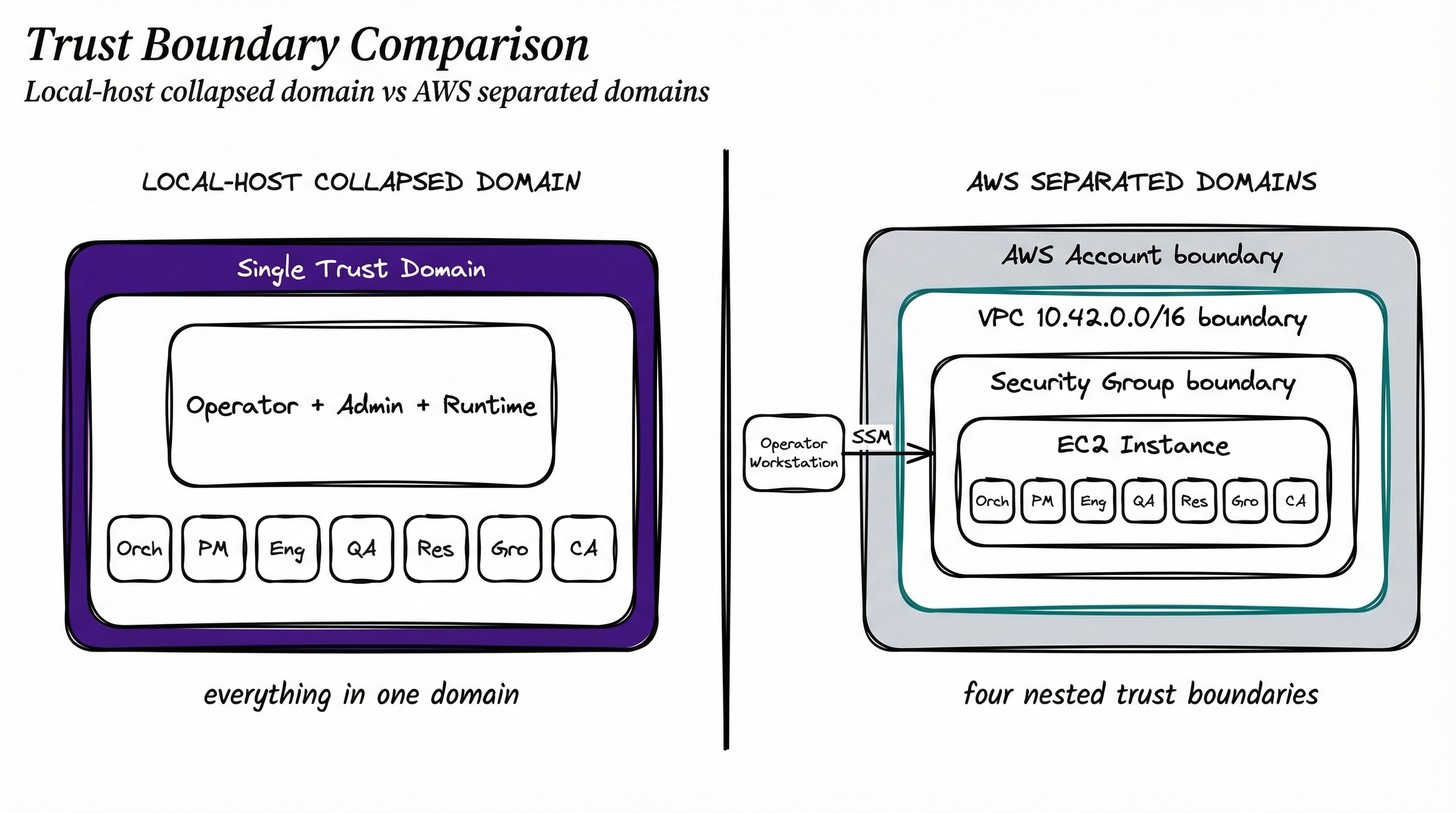
The fundamental difference is the trust domain. A local deployment collapses three roles — operator workstation, deployment admin, and runtime host — into a single machine. An AWS deployment separates them: the operator workstation is your laptop, the deployment admin is your AWS identity (via IAM), and the runtime host is an EC2 instance inside a VPC you control.
Neither is inherently superior. They serve different risk profiles and operating models.
When Local-Host Is The Right Choice
Start here. Seriously.
The local-host path has the lowest setup cost, the fastest feedback loop, and the fewest external dependencies. If you are evaluating Multiclaw for the first time, building a new agent configuration, debugging deployment mechanics, or running a small-scale personal system, local is the right choice.
The Scenario (1) implementation plan is explicit about this scope: “single Ubuntu host only” with a “fixed seven-role topology” and “no cloud, VPC, serverless, or Kubernetes implementation in v1.” The local path is not a stepping stone — it is the canonical Scenario (1) deployment target.
Concrete advantages: zero marginal cost (you own the hardware), fastest inner loop (no cloud API latency), fewer external dependencies (no AWS account or IAM to debug), better fit for solo development, and easier to debug (everything on one machine — journalctl --user -u multiclaw-engineering without SSM sessions).
The limitation is equally clear: a local machine collapses the workstation, the operator context, and the runtime host into the same trust domain. If your laptop is compromised, the attacker has the operator’s credentials, the admin’s access, and the runtime’s data in one shot. The seven-user isolation within the host still contains agent-to-agent lateral movement, but the outer boundary — the one separating the operator from the workload — does not exist.
For many operators, this tradeoff is acceptable. The threat model that matters most is accidental agent mistakes, not nation-state laptop compromise.
When AWS Is The Better Choice
The AWS path becomes rational — not optional — when you need a boundary between the workload and the machine you use every day.
This is not about prestige. It is not about “doing it properly.” It is a concrete infrastructure product choice: you are buying a trust boundary that your laptop cannot provide.
When does that matter?
- You do not want the workload on your daily machine. Seven AI agents running rootless Podman pods, making LLM API calls, executing code in sandboxes — that is a meaningful workload. Running it on the same machine where you write code, attend meetings, and manage credentials introduces blast-radius risk that a separate host eliminates.
- You want reproducible infrastructure. The AWS path uses Terraform to provision VPC, subnet, security group, IAM role, and EC2 instance from a declarative configuration. Tear it down and rebuild it identically. The local path depends on whatever state your workstation is in.
- You need a remotely reachable environment. Agents that run continuously need a host that stays on. A laptop that sleeps, travels, or loses network connectivity is not a reliable runtime for a system designed for bounded autonomy and safe-halt modes.
- You want cleaner separation between operator identity, host identity, and runtime. On AWS, the operator authenticates via IAM. The host has its own IAM instance profile. The runtime agents have their own Linux users. Three distinct identity layers instead of one.
- You expect the system to operate during off-hours. Bounded autonomy mode (routine operations continue when the operator is unreachable for 15+ minutes) and safe-halt mode (freeze at 4+ hours) assume the host is running. A local machine that you shut down at night defeats both modes.
The AWS path is an infrastructure product choice. You evaluate it the same way you evaluate any infrastructure decision: what does it cost, what does it buy, and does the tradeoff match your operating requirements?
The Additional Security Layer AWS Adds
This is the core section. Let me be concrete about what the AWS path actually provisions, because “the cloud is more secure” is not an argument — it is a marketing slogan.
The Terraform configuration in deploy/aws/main.tf provisions five specific infrastructure components that create boundaries the local path does not have:
1. VPC (aws_vpc.this). A dedicated virtual private cloud with its own CIDR block (default 10.42.0.0/16). The Multiclaw host lives in a network that is logically separated from everything else in the AWS account. This is not a shared default VPC — it is a purpose-built network boundary.
2. Security Group (aws_security_group.host). When remote_access is "ssm" (the default), the security group has zero ingress rules — no SSH port exposed. The instance still receives a public IP (required for outbound connectivity to SSM and LLM endpoints via the internet gateway), but the security group permits zero inbound connections. When remote_access is "ssh", ingress is limited to CIDR blocks on port 22 — but I need to be honest here: the default sshCidrBlocks in the manifest is ["0.0.0.0/0"]. If you switch to SSH mode, you must restrict this to your own IP ranges before applying. The default is broad to avoid a broken first-apply, not because open SSH is acceptable. Egress is open for LLM API and 1Password connectivity, consistent with the nftables per-agent enforcement inside the host.
3. IAM Role and Instance Profile (aws_iam_role.ssm, aws_iam_instance_profile.this). The EC2 instance assumes a role with the AmazonSSMManagedInstanceCore policy. This gives it SSM connectivity without exposing SSH. The operator reaches the host through aws ssm start-session — an authenticated, audited, encrypted channel that does not require a public IP or open port.
4. EBS Encryption (root_block_device.encrypted = true). The root volume is encrypted at rest by default. This protects the volume from unauthorized snapshot access and physical disk exposure — but it does not protect data from processes running on the instance. The current cloud-init bootstrap writes non-secret configuration (LLM provider, model, container images) to /etc/multiclaw/bootstrap.env; actual secrets (API keys, 1Password service account tokens) must be injected via a separate mechanism and never passed through user-data. On a local machine, you get at-rest encryption only if you configured LUKS at install time (and the local manifest’s verifyLuks flag is false by default).
5. AMI Selection (data.aws_ami.ubuntu). The instance runs the latest Ubuntu 24.04 Noble Numbat AMI from Canonical’s official publisher account. The same OS baseline as the local path, but from a known-good image rather than whatever your workstation has accumulated over months of use.
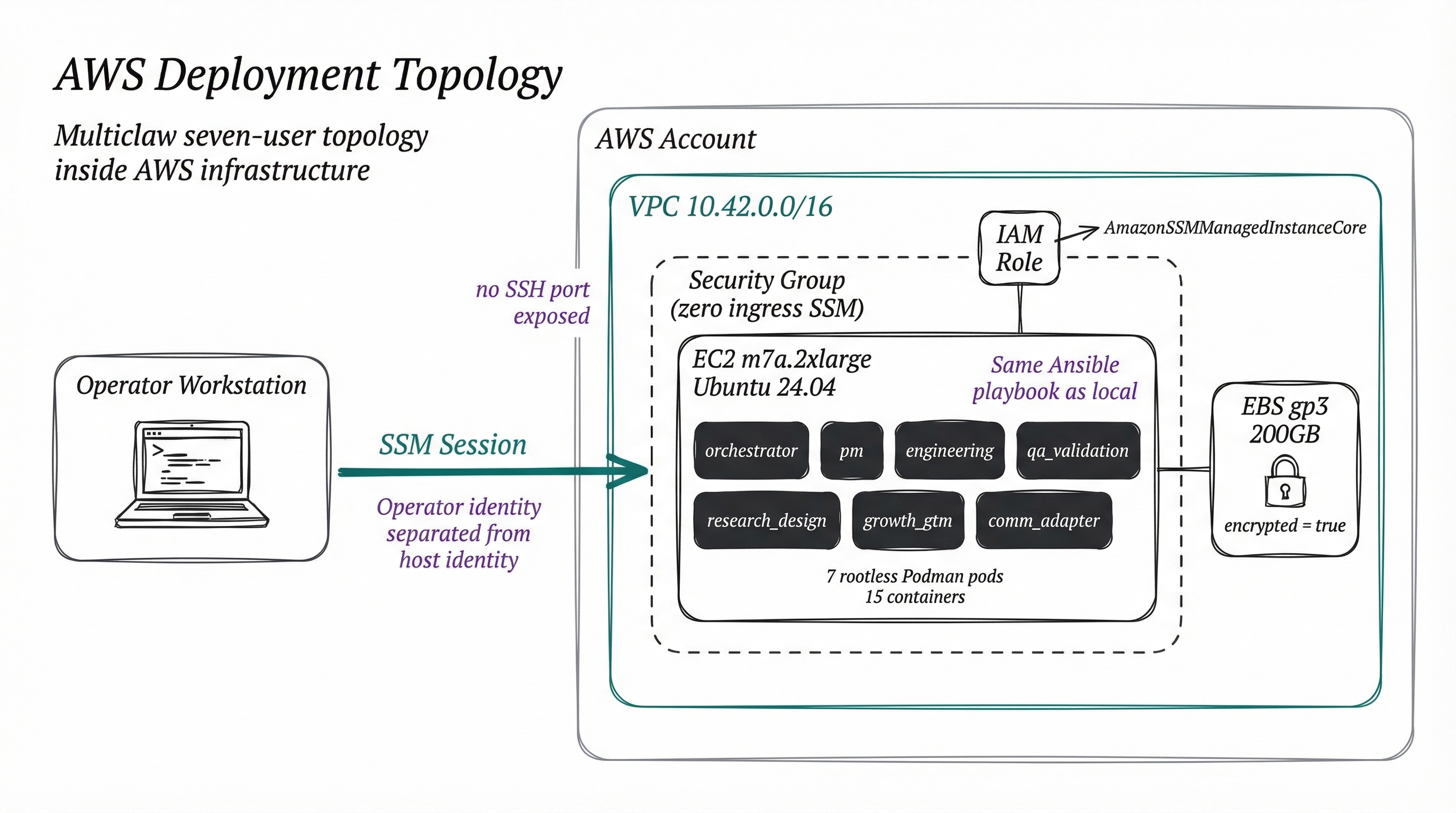
The key insight is simple: AWS wraps the same seven-user topology in an additional network boundary, identity boundary, and administrative boundary. The nftables per-agent rules, the rootless Podman pods, the systemd user units, the bearer-token adapter auth — all of that is identical. AWS adds the outer ring.
The Caveat That Matters More Than the List Above
AWS is not automatic security. I want to be blunt about this because too many infrastructure posts hand-wave the risks and I refuse to be one of them.
The AWS path introduces a new trust root: the AWS account itself. A compromised account — via stolen IAM credentials, a phished console session, or a CI/CD pipeline with overly broad permissions — gives an attacker full access to the EC2 instance, its EBS volume, and all network configuration. AWS separates the runtime from your laptop, but it delegates trust to a cloud account that must itself be hardened: MFA on root and all IAM users, SCPs in an Organization, CloudTrail enabled, and billing alerts for anomalous spend.
The current Terraform configuration uses local state by default — no remote backend, no encryption, no locking. Before any real deployment, configure an S3 backend with encryption, versioning, and DynamoDB locking. This is not yet implemented in the repository. It is a tracked gap.
A misconfigured security group, an overly permissive IAM policy, or Terraform state exposed without access controls can undermine every boundary listed above. AWS gives you the tools to build a stronger boundary. It does not build it for you. The Terraform configuration in this repository makes defensible choices (dedicated VPC, SSM-default remote access, encrypted EBS, scoped IAM role), but those choices must be validated, not assumed.
What You Pay For That Extra Boundary
I want to be honest about the cost because too many infrastructure posts hand-wave this away. AWS is not free, and pretending the tradeoff does not exist insults the reader’s intelligence.
Infrastructure spend. An m7a.2xlarge instance (the default in the aws-host manifest) runs 8 vCPUs and 32 GB RAM — the minimum viable configuration for seven concurrent agent pods. At current on-demand pricing, that is a meaningful monthly cost. Reserved instances and Savings Plans reduce it, but the cost is nonzero and ongoing. The local path has zero marginal cost.
More moving parts. Terraform state, IAM users, MFA, CloudTrail, VPC routing — each is a potential misconfiguration point. The local path has none of these.
More provisioning complexity. The local path is deploy/multiclaw init then deploy/multiclaw apply. The AWS path adds terraform init/plan/apply, cloud-init bootstrapping, and then the same Ansible convergence. Automatable but not invisible.
Different attack surface. IAM policy drift, security group rule sprawl, and account-level misconfigurations create vulnerabilities that do not exist in the local path. The attack surface is different, not necessarily smaller.
Slower iteration and cloud dependency. Re-converging locally takes seconds. The AWS equivalent involves SSM latency and potential instance replacement. Your deployment depends on AWS API availability and correct IAM configuration. A local deployment depends on your hardware being powered on.
The right answer depends on the operator’s threat model and operating model, not ideology. If the primary threat you are defending against is accidental agent mistakes on a machine you physically control, local deployment is sufficient and efficient. If you need the additional trust boundary, continuous uptime, and reproducible infrastructure that a dedicated remote host provides, the AWS cost is justified. There is no universal correct answer.
How To Choose Between AWS And Local
| Criterion | Choose local-host | Signal to graduate | Choose aws-host |
|---|---|---|---|
| Budget | Zero cost is a hard constraint | You start calculating agent uptime value vs. cost | Spend is acceptable for the boundary |
| Uptime | System runs during working hours | You leave the laptop open overnight so agents finish | Continuous operation is a requirement |
| Threat model | Agent-to-agent mistakes on hardware you control | You worry about workstation compromise reaching agents | Workstation/runtime separation required |
| Iteration speed | Fast feedback loops matter most | Local debugging is stable; you need remote access | Reproducibility matters more than speed |
| Operator count | Solo with physical access | A second person needs to reach the host | Remote or multi-operator access required |
| Infrastructure | Manual host prep is fine | You rebuild the host and wish it were declarative | Version-controlled infra via Terraform |
Staged adoption is the recommended path. Start with local-host. Validate the seven-user topology, test your agent configurations, debug the deployment mechanics. When the “Signal to graduate” column starts describing your situation, it is time to move. The manifest schema is shared. The Ansible playbook is the same. The migration is a change of deployment target, not a rewrite.
What This Means For The Roadmap
The two-path architecture reflects a deliberate design principle: one manifest schema, two execution targets, identical host convergence.
The deploy/lib/manifest.sh validation already enforces this. Both local-host and aws-host manifests share schemaVersion, deploymentName, runtime (LLM provider, model, container images), and users (the seven-role topology). The differences are scoped to target-specific concerns: target.host for local operating system and admin user, aws for region, VPC, instance type, and remote access method.
What the local path proves:
- The seven-user topology converges correctly on a single Ubuntu host
- Agent isolation (Linux users, rootless Podman, nftables, bearer-token auth) works at the OS level
- The Ansible playbook is idempotent and milestone-gated
What the AWS path formalizes:
- Network isolation via VPC and security group
- Identity separation via IAM roles and SSM
- Storage encryption via EBS
- Infrastructure reproducibility via Terraform
What remains incomplete — and I want to be honest about the gaps:
- No cost analysis. I have not published expected monthly AWS costs by instance type.
- No benchmarks. I have not measured agent performance differences between local and AWS deployments.
- No migration procedure. There is no documented process for migrating a running local deployment to AWS.
- No multi-operator workflow. The current architecture assumes a single human governor. Multi-operator IAM patterns are not specified.
- mTLS is deferred. Scenario (1) uses bearer tokens for inter-component auth. mTLS is a Scenario (2+) control that the AWS path contemplates but does not implement.
- Sigstore/cosign is deferred. Policy overlay signing is a Scenario (2+) enhancement, not active in either deployment path.
These are not gaps I am hiding. They are gaps I am tracking. The roadmap prioritizes them as the deployment tooling matures past Scenario (1).
Closing
The AWS path is not the default because it is fashionable. It is not the “production” deployment while local is “just for testing.” Both paths produce the same seven-user topology, the same rootless Podman pods, the same systemd user units, the same nftables enforcement, the same bearer-token adapter auth.
The difference is the boundary around that topology. Local collapses operator, admin, and runtime into one trust domain. AWS separates them with a VPC, a security group, an IAM role, SSM access, and encrypted storage. That additional boundary is valuable when your threat model requires it and your operating requirements justify the cost.
Start local. Graduate to AWS when the risk profile or uptime expectations demand it. The manifest schema is shared, the convergence playbook is identical, and the deployment target is a configuration choice — not an architectural migration.
The right deployment path is the one that matches your threat model. Not the one that sounds more serious.
Series Navigation
- Article 1: The Two Patterns of Agent Isolation (and Why You Need a Third)
- Article 2: Seven Users, Seven Vaults: Defense-in-Depth for Multi-Agent Systems
- Article 3: The Communication Problem: Why Multi-Agent Messaging is Harder Than You Think
- Article 4: Governance by Architecture: How to Stop Your Orchestrator From Going Rogue
- Article 5: Two Deployment Paths: When Your Multi-Agent Host Should Leave Your Laptop (you are here)